





WhatsApp is rolling out a significant update that changes how we interact within community circles and professional hubs. For years, entering a new digital conversation felt like walking into a room mid-sentence. However, the latest Africa News Update 2026 confirms that Meta is finally addressing this hurdle by allowing users to share whatsapp group chat history with newcomers.
Breaking the Silence for New Members
Under the traditional system, anyone joining a group started with a blank slate. This often led to confusion, requiring admins to repost rules or context. The new enhancement allows administrators and members to toggle an option that shares up to 100 recent messages from the previous 14 days. This ensures that the whatsapp group chat history remains accessible to those who need to catch up quickly.
This transition is particularly vital for coordinating regional events in Africa or managing fast-paced business communications. By making the whatsapp group chat history visible, teams can maintain a seamless flow of information without repetitive manual forwarding.
How the New History Sharing Works
The process is designed to be transparent. When you add a contact, a prompt appears asking if you wish to include recent messages.
- Transparency: WhatsApp notifies the entire group when history is shared.
- Encryption: Even though messages are “shared,” they remain protected by end-to-end encryption.
- Visual Cues: Shared messages appear in a distinct color to differentiate them from live conversation.
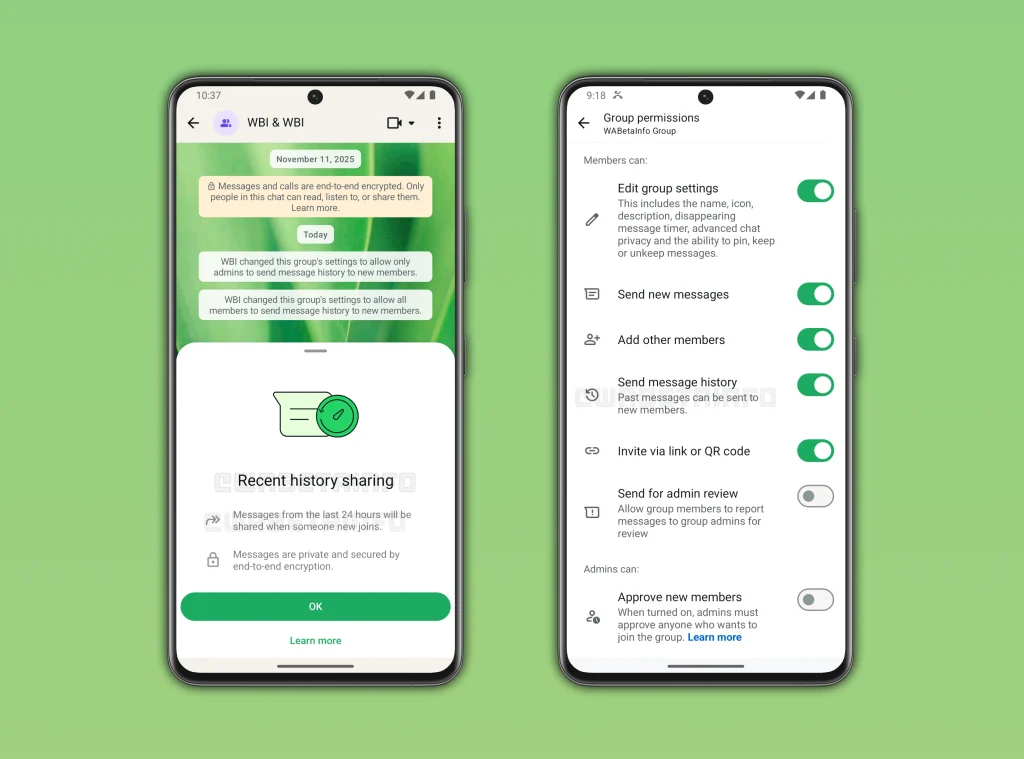
While this feature is currently in beta testing via TestFlight for iOS, it is expected to reach the general public across Android and Desktop platforms soon. This is a major step in improving digital communication across the continent.
Manual Steps: How to Export Your WhatsApp Group Chat History
While the automatic sharing feature is great for new members, you might still need a permanent record for legal or personal reasons. If you need to save your whatsapp group chat history externally, follow these professional steps:
- Navigate to the specific chat or group you wish to save.
- Select More Options (the three dots) and tap More.
- Choose Export Chat.
- Decide whether to Include Media or export Without Media.
- Send the resulting .txt file to your email or save it to a cloud drive.
Note: Exported files are for reading only. You cannot re-import a text file back into WhatsApp to restore a chat. For that, you must use the standard Google Drive or iCloud backup methods.
Privacy and Security Considerations
As we see in the Africa News Update 2026, digital privacy remains a top priority. Admins should be cautious when sharing whatsapp group chat history if the previous discussion contained sensitive data. While this tool aids collaboration and productivity, it requires a level of trust among participants.
For those using the app for social celebrations, such as sending festive holiday greetings, this feature makes it easier to see what others have already shared so you don’t repeat the same Christmas messages.
The Future of Group Messaging in Africa
This update reflects a broader trend of making instant messaging more like collaborative workspaces. Whether you are tracking historical commemorations in the region or managing a local football fan club, having the whatsapp group chat history available at a glance is a game-changer.
Stay tuned to AfricaEye for more updates on how mobile technology and software updates are shaping the way we connect in 2026.